To see reposts on TikTok, open the profile and tap the Repost tab, the icon with two arrows next to Videos. On your own profile it lists everything you reposted; on someone else's profile, what they reposted. On a computer, tiktok.com shows the same Reposts tab on public profiles. Private accounts only show reposts to followers.
This guide shows how to see reposts on TikTok in every case. That means your own, someone else's, your friends' reposts in your feed, and on a PC. It's part of our TikTok and Snapchat guides. If you want to see someone's reposts without an account, our free tool does that in your browser.
How to see your reposts on TikTok
Every video you repost is saved on your profile. According to TikTok's Help Center, you find your reposted content on your profile under the Repost tab.
- Open your profile. In the TikTok app, tap Profile at the bottom of the screen.
- Tap the Repost tab. It's the icon with two arrows, in the row of tabs above your videos, next to the Videos tab.
- Browse your reposts. Your reposted videos appear in a grid. Tap one to play it.
Changed your mind about a repost? Open the video and tap the Share button, then Delete repost. You can also press and hold the video and tap Remove repost. Keep in mind that removing a repost also deletes the replies to it.
How to see someone's reposts on TikTok
Other people's reposts sit in the same place: on their profile, in the Repost tab.
- Open their profile. Search for their username, or tap their name on one of their videos.
- Tap the Repost tab. Look for the two-arrows icon next to Videos, above their video grid.
- Watch their reposts. Tap any repost to play it. The original creator's name stays on each video.
You don't need to follow someone to see their reposts if their account is public. If the account is private, only approved followers can see its reposts. TikTok has no separate setting to hide reposts: they follow the account's privacy, as our own check in the app confirmed.
One thing to know: opening someone's Repost tab is a profile visit. If you both have Viewer history on, you can appear in their Profile views. Our test explains whether they can see you viewed their reposts, and you can turn off Viewer history if you'd rather not appear.
How to see friends' reposts on your For You feed
You don't have to visit a profile to see what your friends repost. TikTok shares reposts with the reposter's friends and community in their For You feed.
A reposted video looks like any other post. It carries a repost label with the profile photo and nickname of the friend who reposted it. Tap their photo at the bottom of the video to repost it yourself or to reply to their repost.
Want all of a friend's reposts at once? Open their profile and tap the Repost tab, as shown above.
How to see reposts on TikTok on a PC
The Repost tab also exists on the website. We checked it on a computer in October 2026, without logging in.
- Open the profile on tiktok.com. Go to tiktok.com/@username in your browser, or search for the account.
- Click Reposts. The tabs under the bio read Videos, Reposts and Liked (some accounts show more tabs).
- Play a repost. Click any video in the grid to watch it.
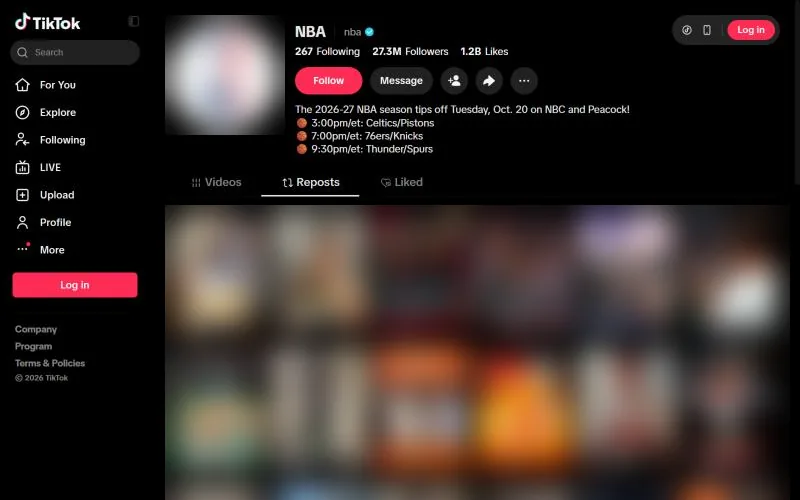
Without an account, tiktok.com shows a login pop-up after a few videos. In our earlier test it appeared at the fourth video and could be closed. Our TikTok repost viewer shows the same public reposts without pop-ups and lets you save them as MP4. To see the account's own videos and profile too, use our anonymous TikTok viewer.
How to repost a video on TikTok
Want to add a video to your own Repost tab? TikTok's Help Center lists three ways:
- Tap the Share button on the video, then tap Repost.
- Press and hold the video, then tap Repost.
- If a friend reposted it, tap their profile photo at the bottom of the video, then tap Repost.
The video is reposted as soon as you tap. It then appears in your Repost tab and in your friends' For You feeds with your name on the label. On a public account, anyone who sees your reposts can reply to them.
Why can't I see someone's reposts?
If the Repost tab is empty or missing, these are the usual reasons.
Private account
Only approved followers can see a private account's reposts.
No reposts yet
The account hasn't reposted anything, or it removed its reposts.
Original video removed
If the creator deletes a video or makes it private, it disappears from every Repost tab.
Wrong account
Check the username, including dots and underscores.
TikTok reposts FAQ
Can I see someone's reposts without following them?
Yes, if their account is public. Open their profile and tap the Repost tab. Private accounts only show reposts to approved followers.
Does looking at someone's reposts notify them?
No notification is sent. Opening their profile can show you in their Profile views, but only if you both have Viewer history on.
How do I remove a repost?
Open the video, tap the Share button and choose Delete repost, or press and hold the video and tap Remove repost. Replies to the repost are deleted too.
Can I see a private account's reposts?
Only if they approved you as a follower. No honest app or website can show them otherwise.
Where are reposts on TikTok on a computer?
On tiktok.com, open the profile and click Reposts, next to Videos. It works on public profiles even without logging in.